

Before you start
- A TikTok login with access to the ad accounts you want to track. Cometly lists the ad accounts covered by the access you approve when you sign in.
- The Administrator or Advertiser role in the Cometly space (a space is a workspace inside your Cometly account, with its own data and integrations). A Viewer cannot connect ad accounts. See Space roles.
- The Cometly pixel on your landing pages. The pixel is the script that records the visitors who reach your site. See Install the pixel.
Connect TikTok Ads
1
Open the TikTok Ads row
In the left sidebar, click Integrations. Under Ad Platforms, find the TikTok Ads row.
2
Sign in with TikTok
Click Sign in with TikTok. A window opens. Log in to TikTok and approve access for Cometly.When the window shows Your profile was synced successfully, click Done.
3
Connect your ad accounts
The row expands and shows your profile (your Cometly name, for example Jane Doe’s TikTok Profile) with an Ad Accounts table. Use Search ad account to find an account.Make sure you are in the space the ad account should report into, then click Connect & Sync Data next to it.
Check it worked
You see the message Ad Account Connected - Data will sync in 30-60 minutes, and the ad account shows Connected with the space name in the Space column. It is also listed in the Connected TikTok Ad Accounts card, with the name of who connected it. Within 30 to 60 minutes, your active campaigns start to appear in Ads Manager under the TikTok ad account, on the Campaigns, Ad Groups and Ads tabs.Add Cometly’s URL parameters
Every TikTok ad you want to track needs these parameters on its URL: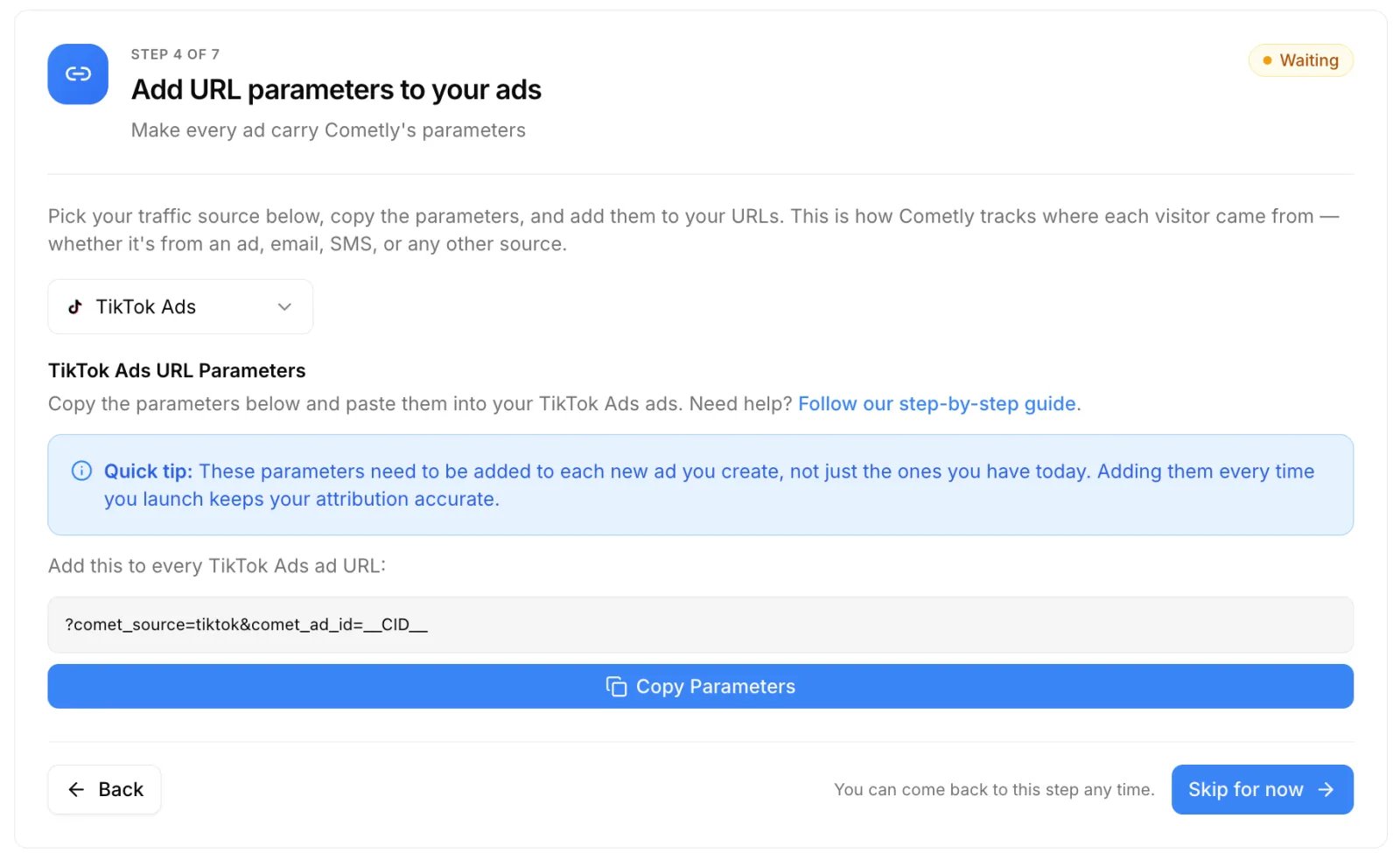
comet_source = tiktok and comet_ad_id = __CID__ as custom parameters. If the URL already contains a ?, start the Cometly parameters with & instead. To copy the parameters in Cometly, open Setup, step 4 Add URL parameters to your ads, select TikTok Ads and click Copy Parameters. For the full walkthrough, see TikTok Ads URL parameters.
Cometly does not add the parameters to your TikTok ads for you, but it checks them on every sync. An ad is flagged when its website URL does not carry both comet_source=tiktok and comet_ad_id=__CID__. Ads without a website URL are not flagged. Flagged ads get a red dot with the tooltip UTM Setup Error on the Ads tab of Ads Manager (the Tracking Status column preset shows each ad’s Ad Links, URL Params and Tracking Status). They are also counted in Setup step 4 and raise a Tracking Error: TikTok notification with the buttons View affected ads and Copy Parameters, which clears on its own once every running ad carries the parameters. See Fix UTM Setup Errors.
Send conversions back (Conversion API)
In Events Manager, open the Conversion API tab and expand the TikTok row. Under Master Data Sharing Settings you choose Turn off data sharing, Send only attributed events or Send all events. Under Configure default pixels you enter a pixel for each TikTok ad account and select a default account, and you can add custom rules for specific events. See Configure the TikTok Conversion API.What to expect after connecting
- First data. Active campaigns start populating data within 30 to 60 minutes of connecting an ad account. In Ads Manager, a TikTok ad account has the tabs Campaigns, Ad Groups and Ads.
- Refresh. Cometly refreshes TikTok ad data every 30 minutes and pulls the previous two days again each day, so late changes from TikTok are captured. See How often data updates in Cometly.
- Existing campaigns. Campaigns that were running before you connected may need tracking turned on under Settings, Campaign tracking. New campaigns are tracked automatically while Auto-track new campaigns is on. See Manually turn on tracking for your ad campaigns.
- Row status. Last Synced is when your TikTok connection was last refreshed (you signed in or clicked Resync), not the last data refresh. The status is Connected, or Connection Issue, Resync Required when Cometly cannot load your ad accounts from TikTok.
- Resync and Disconnect. Resync opens the TikTok sign-in again to refresh the connection. Disconnect at the top of the row removes your profile and every ad account connected through it. Disconnect next to an ad account removes only that account from its space. Data stops tracking immediately. See Disconnect an ad platform connection.
Troubleshooting
The sign-in window shows “We are not able to sync your profile.”
TikTok did not complete the sign-in. The message ends with the reason TikTok gave. Click Done, then click Sign in with TikTok and try again. If it keeps failing, send the full message to support.”Connection Issue, Resync Required” or “Action Required: Resync TikTok Connection”
Cometly has stopped receiving TikTok ad data for the space because TikTok no longer accepts the connection. The alert arrives by email and in-app notification. The user who connected the profile needs to open Integrations, expand TikTok Ads and click Resync. When data flows again you get a TikTok Connection Restored notification, and the past 48 hours are restored automatically. See Ad data not syncing for hours or days.An ad account is missing, or was disconnected after a resync
The Ad Accounts table only lists the ad accounts covered by the access you approved in the TikTok sign-in. Click Resync and approve access again with the ad account included. A connected ad account that is no longer covered after a resync is disconnected from its space.Frequently asked questions
Does Cometly import historical TikTok ad data?
No. Cometly does not track campaigns retroactively. It tracks a campaign from the moment its tracking is turned on, and from that point forward. See Tracking historical ad data.Can more than one person on my team connect TikTok Ads to Cometly?
Yes. Each Cometly user connects their own TikTok profile, and anyone with the Administrator or Advertiser role in a space can connect ad accounts to it. An ad account can still only be connected to one space at a time.How long do changes I make in TikTok Ads Manager take to show in Cometly?
They appear on the next data refresh, which runs every 30 minutes for TikTok Ads. Changes you make in the Cometly Ads Manager, such as turning a campaign on or off, are pushed to TikTok immediately. See How changes to ads sync between ad platforms and Cometly.Next steps
- Add URL parameters to your ads
- Configure the TikTok Conversion API
- Analyze your ads in Ads Manager
- Fix UTM Setup Errors
- Connect your other ad platforms