

comet_source and comet_ad_id. When someone clicks your ad, email or post, the tags tell Cometly which source, and which ad, the click came from.
This is what lets Cometly attribute (tie back) each lead and sale to the ad or channel that produced it. With the parameters in place, your reports show which ads bring in customers, so you can decide where to spend more and what to turn off.
Start here
Set up URL parameters on your ads, emails, SMS and custom sources so Cometly can attribute your events to the right source. Choose what you want to configure:- Meta Ads
- Google Ads
- TikTok Ads
- LinkedIn Ads
- Pinterest Ads
- Snapchat Ads
- X Ads
- Reddit Ads
- Taboola Ads
- AdRoll Ads
- Microsoft Ads
- Whop Ads
- ChatGPT Ads
- SMS
- Social organic
- Custom sources
The parameters need to be added to each new ad you create, not just the ads you have today. Adding them every time you launch keeps your attribution accurate.
Meta Ads URL parameters
These URL parameters are required on every Meta ad you want to track with Cometly:
Append to existing URL parameters on your ads
If you already have parameters in the URL parameters box, append the Cometly parameters with an& sign, as in this example:
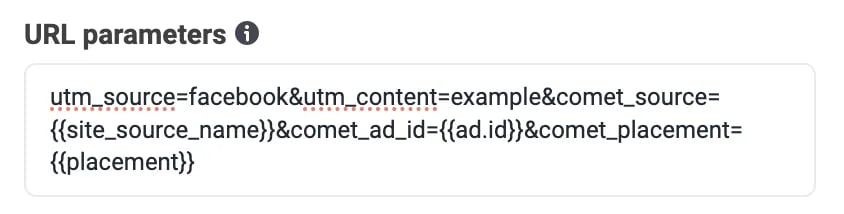
& sign, as in this example:
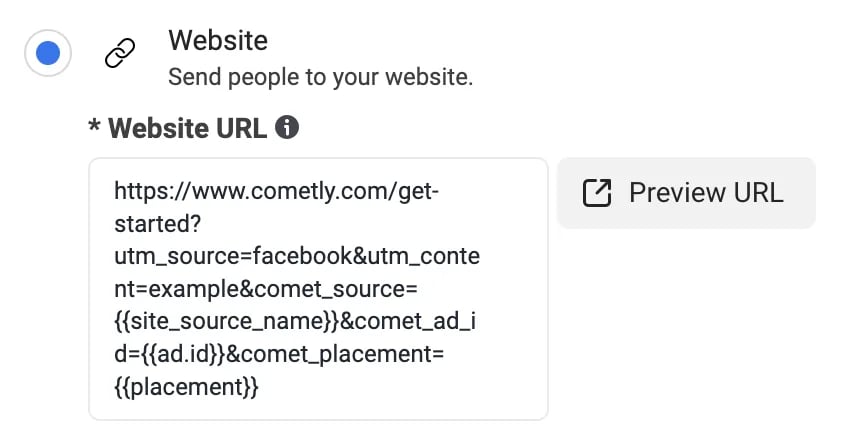
Append parameters to a URL with a product variant
Example: If your Website URL is:Google Ads URL parameters
Google Ads applies tracking templates in this order of priority: ad level, ad group level, then campaign level. A tracking template at the ad or ad group level overrides your campaign-level template, which can cause tracking issues.
Cometly Google tracking templates
Paste the matching template into the Tracking template field of each campaign. Campaign type: Search, Display, Discovery, Demand Gen, ShoppingAdd the tracking template in Google Ads
1
Open your campaigns
In Google Ads, go to Campaigns > Campaigns > Campaigns.
2
Select the campaigns and open Settings
Select the campaigns you want to add the template to, then click Settings.
3
Click Edit
Select the campaigns again, then click Edit.
4
Choose Change tracking templates
In the Edit menu, select Change tracking templates.
5
Paste the template and apply
Paste the Cometly tracking template and click Apply.
Append to an existing tracking template
You can have a tracking template at both the campaign and the ad group level if you need to. Append the Cometly parameters to your existing template. Example: your campaign or ad group currently has this template:TikTok Ads URL parameters
1
Open Build URL parameters
On your ad’s page in TikTok Ads Manager, go to the Ad Details section. Under URL, click Build URL parameters.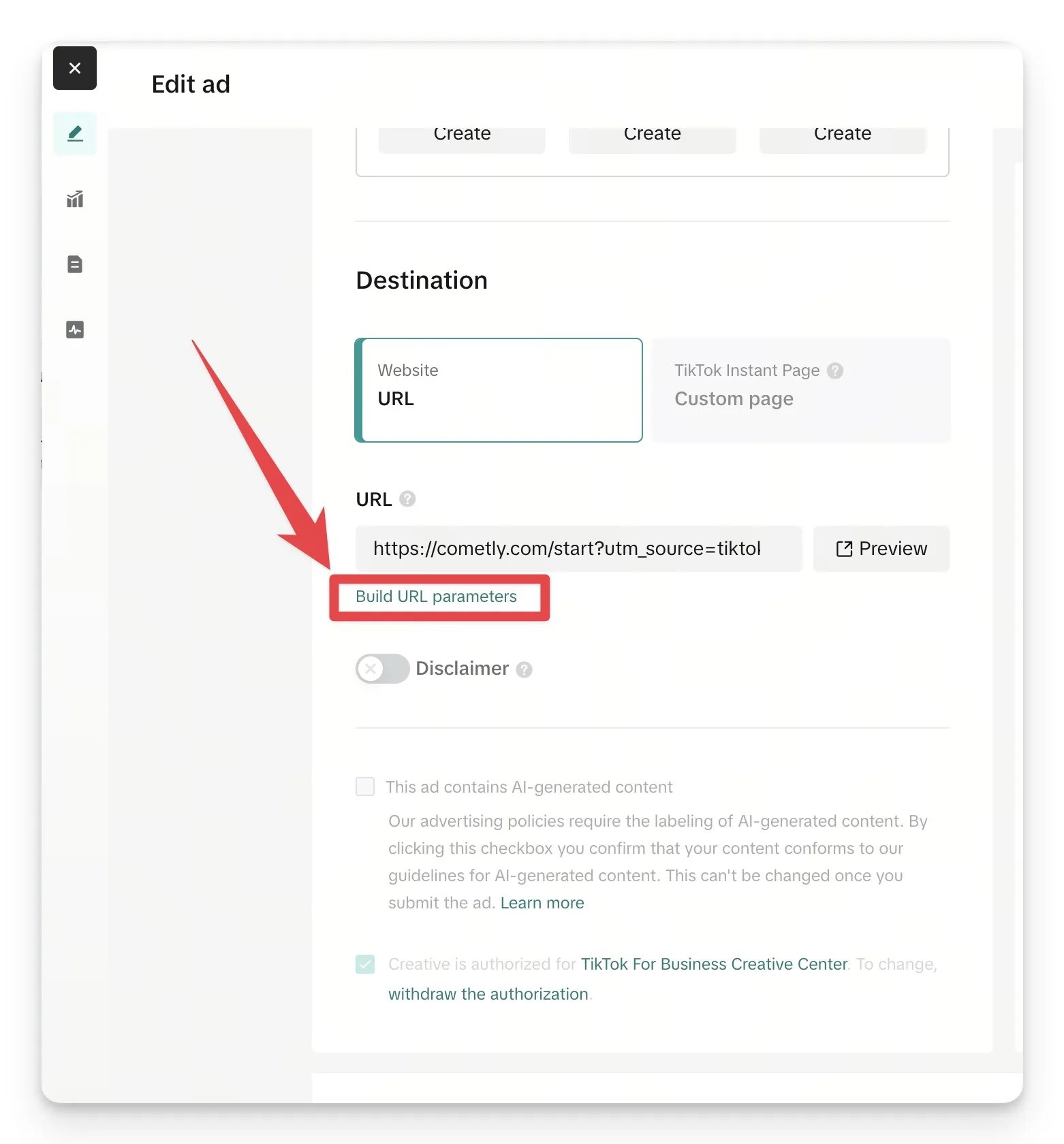
2
Add the custom parameters
Under Custom parameters, add these two parameters and click Apply: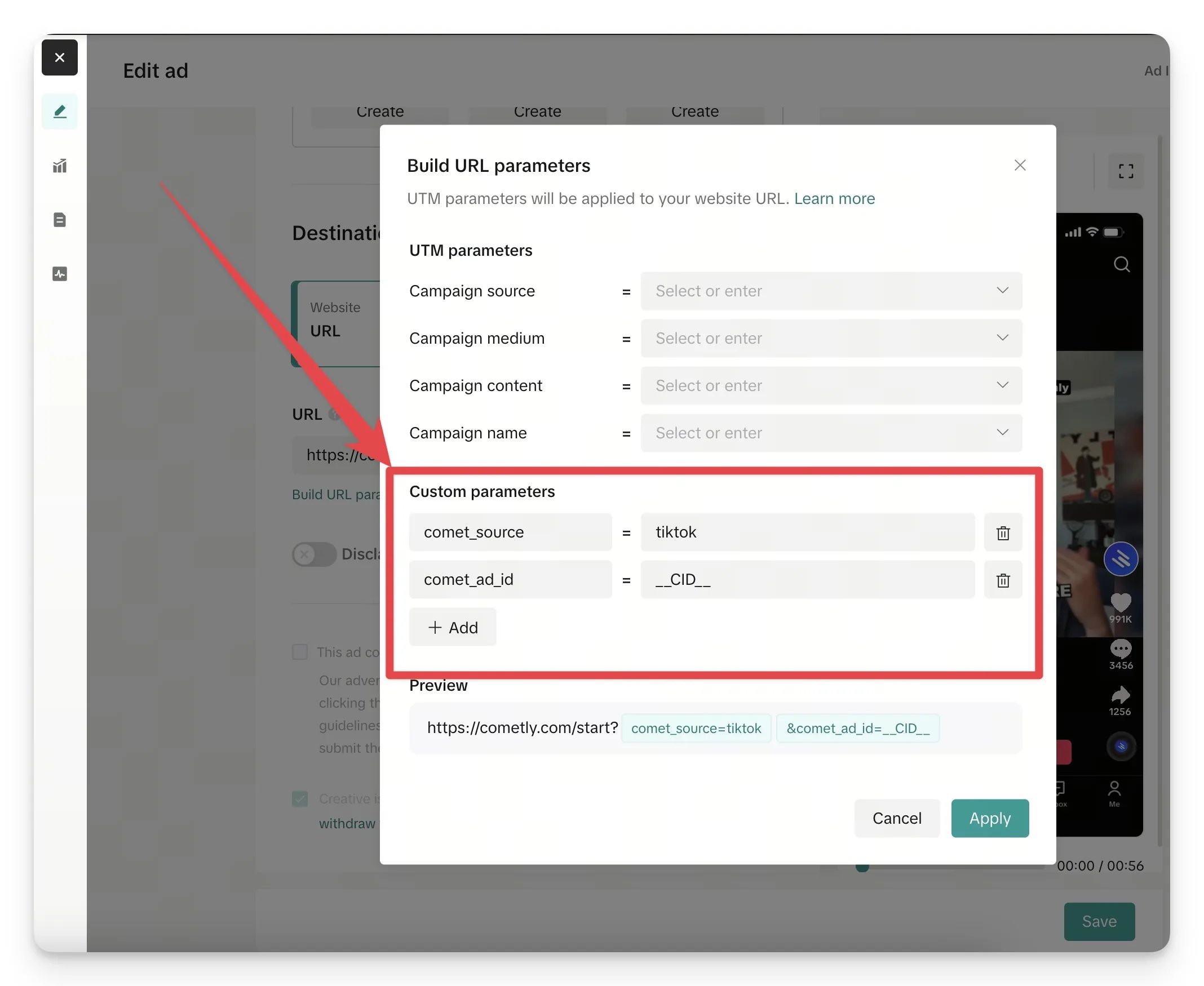
comet_source=tiktokcomet_ad_id=__CID__
3
Save the ad
Back on the Edit ad page, click Save.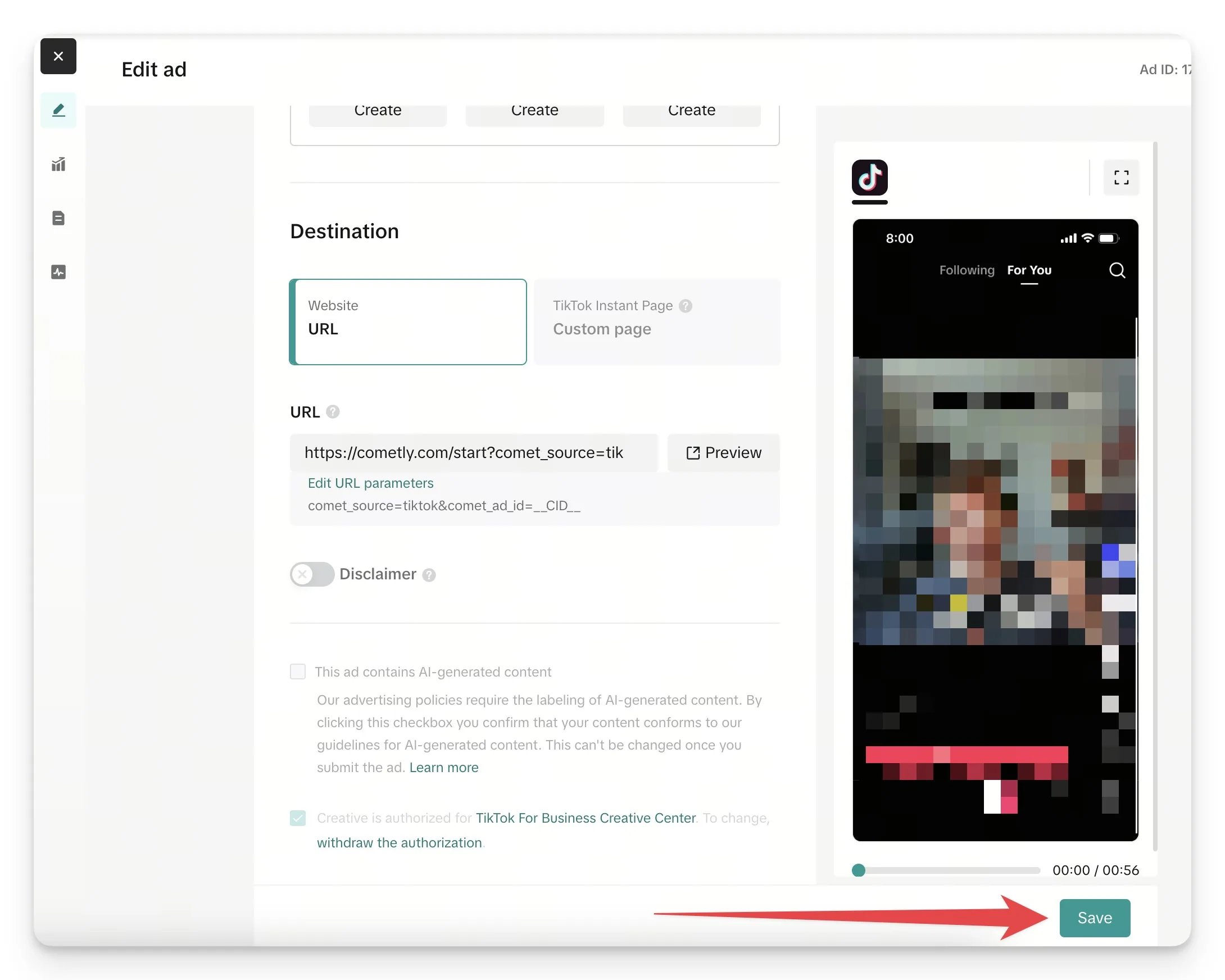
LinkedIn Ads URL parameters
At the Campaigns level in LinkedIn Campaign Manager, go to URL tracking parameters and add (or append) the URL parameters below. Save your changes after you add them.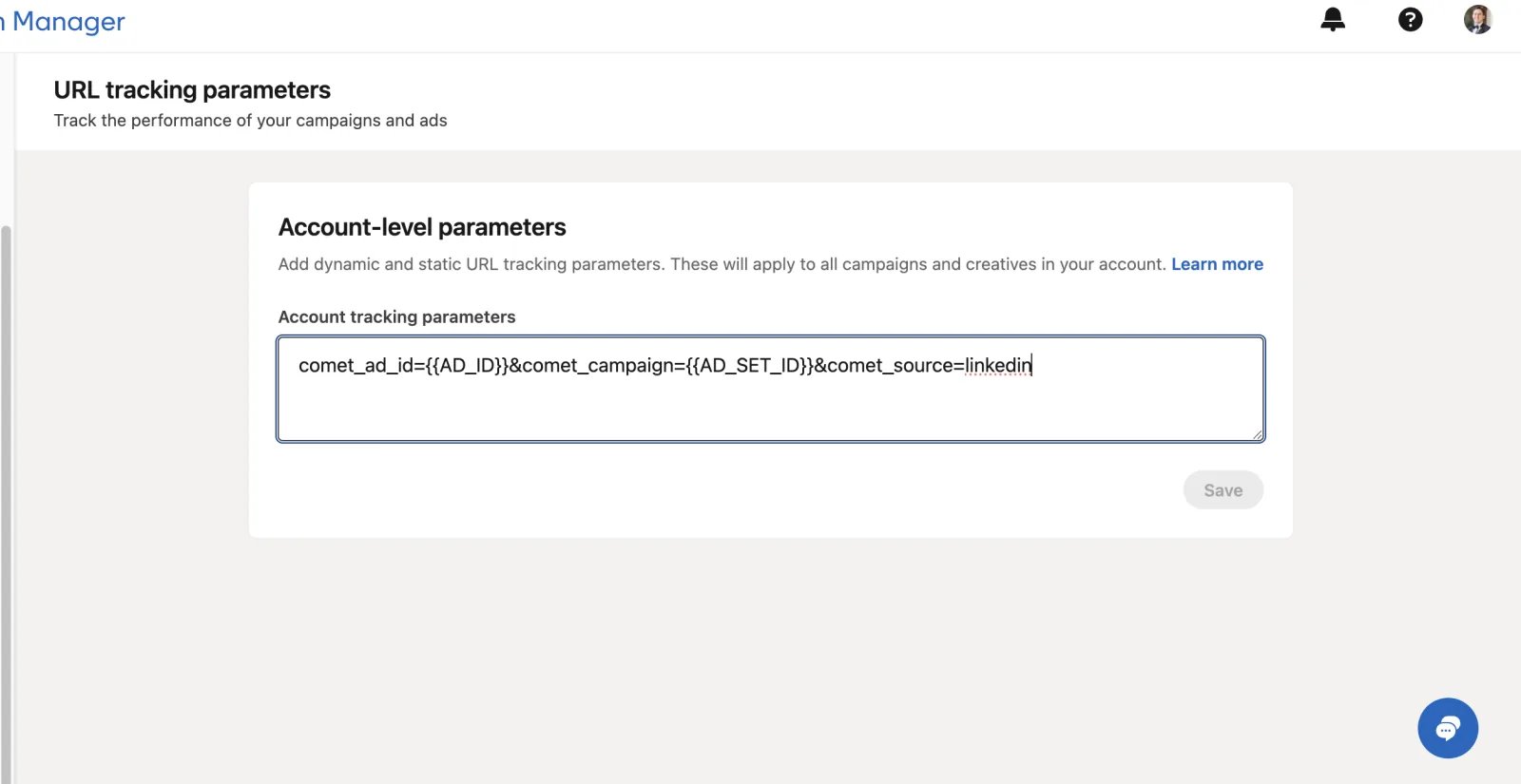
LinkedIn updated the names of its dynamic parameters in October 2025. If your LinkedIn ad account was created before October 2025, use the legacy parameters. If it was created after October 2025, use the new parameters.
Pinterest Ads URL parameters
Add these URL parameters to the end of the Destination URL on your Pinterest ads:Snapchat Ads URL parameters
Place these URL parameters on your Snapchat ads:X Ads URL parameters
Place these URL parameters on your X ads:Reddit Ads URL parameters
Place these URL parameters on your Reddit ads:Taboola Ads URL parameters
Place these URL parameters on your Taboola ads:AdRoll Ads URL parameters
Place these URL parameters on your AdRoll ads:Microsoft Ads URL parameters
Use the tracking template that matches the campaign type. Campaign type: Search, Video, Display, Discovery, ShoppingWhop Ads URL parameters
Whop Ads tracking is fully automatic. There is nothing to paste: the Cometly parameters are applied to each Whop ad for you. See Whop Ads.ChatGPT Ads URL parameters
Place these URL parameters on your ChatGPT ads, or let Cometly add them for you:Email URL parameters
Append this URL parameter to the links in your emails:SMS URL parameters
Append this URL parameter to the links in your SMS messages:Social organic URL parameters
To attribute organic traffic from social platforms like Instagram and Facebook accurately, append a URL parameter to your links. This identifies the source of the traffic and reduces “No Source” in your reports. By default, Cometly tracks the referrer from social platforms. But the referrer is not always passed correctly. For example, when someone clicks a link inside the Instagram or Facebook app, the referrer may be recorded as your own website instead of the social platform, because these apps do not pass referrer information reliably. Adding a URL parameter makes sure the traffic source is always tracked.How to append the parameters
Custom tracking URL parameters
To track a custom source in your reports, put the name of the source in thecomet_custom parameter and add it to the end of your link. Then use the URL Parameters filter in Report Builder to filter by it.
Check it worked
For your ads, open Tracking Health and look at the URL Parameters check. It passes when no active ad in an active, tracked campaign has a URL parameter error, and step 4 of Setup, Add URL parameters to your ads, then shows as complete. After you connect an ad account, the check waits about 2 hours while the first ad data syncs. If ads still have errors, step 4 lists each affected platform with its number of ads.Frequently asked questions
Why does Cometly show a UTM Setup Error on my ads?
A red dot with the tooltip UTM Setup Error in the Ads Manager means at least one active ad is missing the Cometly URL parameters or has them set up incorrectly. Copy the parameters again from step 4 of Setup and compare them with what is on the ad. Fix UTM Setup Errors walks through the checks for each platform.How long does it take for Cometly to pick up URL parameter changes?
Cometly reads your ads’ parameters each time it refreshes your ad data, so a change does not show right away. Allow up to 1 hour for the next data refresh before you troubleshoot further.What happens to clicks that don’t have Cometly URL parameters?
The click does not carry the information Cometly needs to attribute it to that ad. Cometly still tracks the referrer (the site the visitor came from), but the referrer is not always passed correctly, so some of that traffic can show as “No Source” in your reports.Next steps
- Create and set up your events
- Check your setup in Tracking Health
- Fix UTM Setup Errors on your ads
- Add parameters to URLs that already have a variant parameter
- Track custom sources with a custom URL parameter