

- Creating an Ads API key in ChatGPT Ads Manager (this is what gives Cometly access to an ad account)
- Connecting the ad account inside Cometly (pasting that key)
- Getting Cometly’s URL parameters onto your ads (this is how Cometly ties each visit back to the right ad, and Cometly can do it for you)
Step 1: Create an Ads API key in ChatGPT Ads Manager
- Sign in to ChatGPT Ads Manager at ads.openai.com.
- Select the ad account you want to connect.
- Go to Settings → General → API Keys.
- Click Create New Key and copy the key.
Step 2: Connect the ad account in Cometly
- In Cometly, go to Integrations and find ChatGPT Ads under Ad Platforms.
- Click Connect with API key.
- Paste your key into the Ads API key field.
- Click Connect ad account.
Step 3: Add Cometly’s URL parameters to your ads
ChatGPT Ads adds query parameters to your landing page from a template called Tracking parameters. It can live on the campaign, the ad group, or the ad (the Edit Ad window is where Ads Manager shows it), and you can also set one account-wide default. There are three ways to get Cometly’s template onto your ads. Pick one.Option 1: Let Cometly add the parameters for you (recommended)
- In Cometly, go to Integrations and find ChatGPT Ads.
- Click Tracking next to the ad account.
- Turn on Let Cometly add the parameters for me.
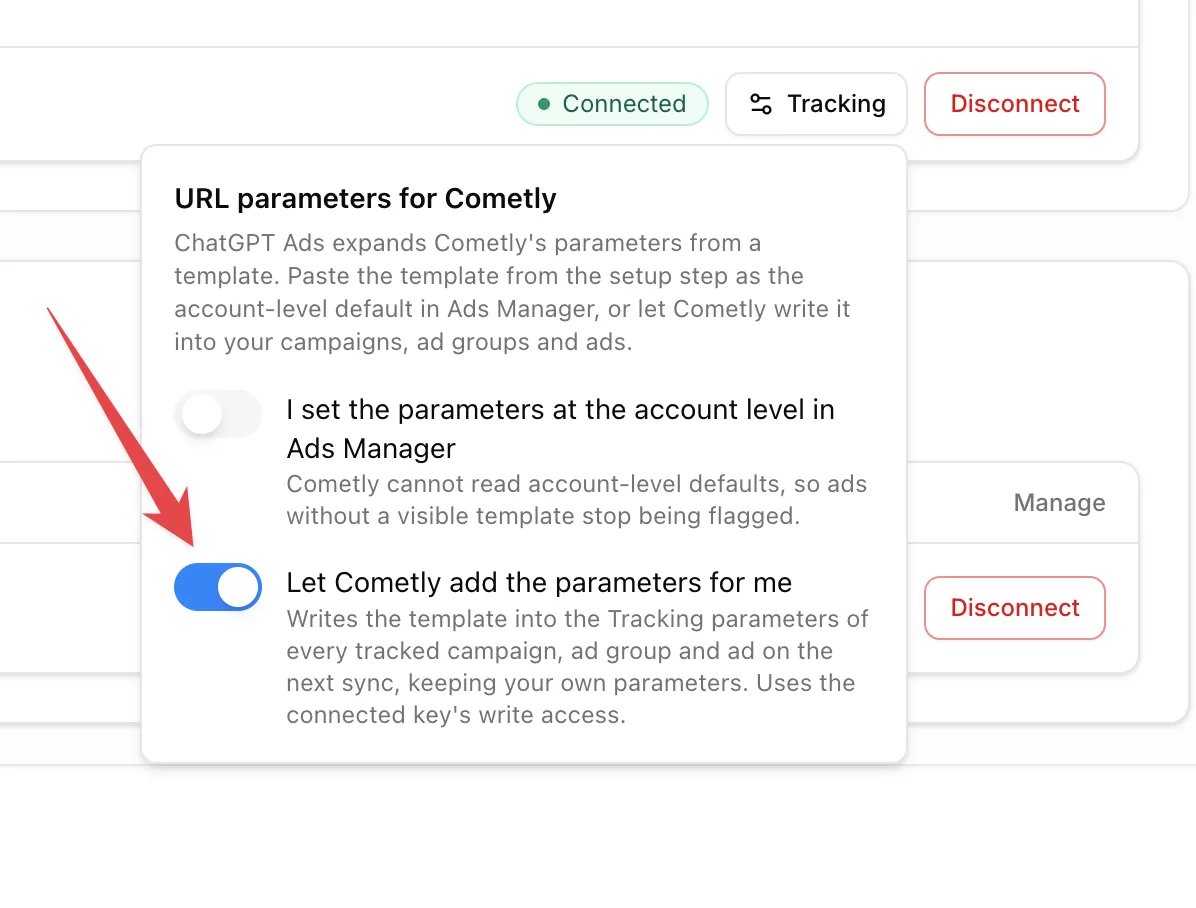
Option 2: Paste the template into each ad
- In ChatGPT Ads Manager, open the ad you want to track and choose Edit Ad.
-
Find Tracking parameters and paste the following:
- Save the ad.
- Repeat for every ad you want to track.
Option 3: Set the template once at the account level
In ChatGPT Ads Manager you can set the template as the account default so every ad inherits it. Cometly can’t read account-level defaults, so after you do this, click Tracking next to the ad account in Cometly and turn on I set the parameters at the account level in Ads Manager. That stops your ads from being flagged as missing parameters.Tracking parameter breakdown
These placeholders are filled in automatically when someone clicks your ad, which lets Cometly match each click to the right campaign, ad group, and ad.
Check it worked
In Cometly, go to Integrations and find ChatGPT Ads: the ad account shows Connected. After the first sync, your ChatGPT campaigns, ad groups, and ads appear in the Ads Manager, and the Tracking Status column preset shows no ads flagged for missing URL parameters.What to expect after connecting
Your first sync starts as soon as the ad account is connected. After that, Cometly refreshes ChatGPT Ads data every 30 minutes and re-syncs the previous two days each morning, so spend that OpenAI reports late is captured. If you need history older than that, contact Cometly support. OpenAI finalizes spend about 7 to 8 hours after the fact, so the most recent hours can look low in Cometly until they settle. Your ChatGPT campaigns, ad groups, and ads appear in the Ads Manager along with spend and performance, and revenue from tracked conversions is attributed back to your ChatGPT ads. New campaigns you launch are picked up automatically when Auto-track new campaigns is turned on for your space (Settings, then Campaign tracking under Workspace). Ads that are missing Cometly’s URL parameters are flagged in the Ads Manager (the Tracking Status column preset) so you can fix them. If you have ads management permission, you can also rename campaigns, ad groups, and ads, change campaign budgets, and pause or activate them from the Cometly Ads Manager. Ad groups show their max bid in the Budget column. To send your conversions back to ChatGPT Ads so it can report and optimize on them, set up the ChatGPT Ads Conversion API.Troubleshooting
”ChatGPT Ads did not accept this key”
The key is most likely from the OpenAI API platform (platform.openai.com) or was deleted. Create an Ads API key in ChatGPT Ads Manager under Settings → General → API Keys and paste that one.”[Ad account] is already connected to another space of this team”
An ad account can only report into one space per team. Disconnect it in the space named in the message first, then connect it here.The account shows “New key needed”, or you got an “Action Required: New ChatGPT Ads API key” email or in-app notification
OpenAI no longer accepts the key on file, which usually means it was revoked or rotated in ChatGPT Ads Manager. Create a new key, click Replace key next to the account in Cometly, and paste it. Data resumes on the next sync.Ads are flagged for missing URL parameters
The quickest fix is to click Tracking next to the ad account and turn on Let Cometly add the parameters for me. Otherwise, open the ad in ChatGPT Ads Manager, choose Edit Ad and check that Tracking parameters contain the template from Step 3. If you set the template as the account default instead, turn on I set the parameters at the account level in Ads Manager under Tracking.No spend showing yet after connecting
Give the first sync a few minutes, and note that data refreshes on a 30-minute cycle. OpenAI also reports spend 7 to 8 hours late, so very recent activity may not appear yet.Conversions aren’t attributed to ChatGPT Ads
Confirm the ad has Cometly’s URL parameters. If your landing page redirects visitors to another URL, make sure the redirect keeps the full query string, includingoppref and the comet_ parameters.
What to send support
If none of these options work, see Contact support and let us know:- The name of the ChatGPT ad account you’re trying to connect
- A screenshot of the ad’s Tracking parameters (Edit Ad) in ChatGPT Ads Manager
- Whether the account shows Connected or New key needed in Cometly
Frequently asked questions
Do I need the Cometly pixel installed to track ChatGPT Ads?
Yes. The Cometly pixel is the small script on your website that records each visit, and the URL parameters on your ads tell it which ChatGPT ad the visit came from. Without the pixel, Cometly has no record of the visit to tie a lead or sale to. See Install and verify the Cometly pixel.Can Cometly send conversions back to ChatGPT Ads?
Yes, through the Conversion API, which sends the leads and sales Cometly records to OpenAI server-to-server. It is set up separately after the ad account is connected, and it uses its own pixel and Conversions API key. See ChatGPT Ads Conversion API.What happens when I disconnect a ChatGPT ad account from Cometly?
The ad account’s data immediately stops tracking for that space. To disconnect, go to Integrations, find ChatGPT Ads, and click Disconnect next to the ad account, then confirm.Next steps
- Configure the ChatGPT Ads Conversion API to send your leads and sales back to ChatGPT Ads
- Use the Ads Manager to compare your ChatGPT campaigns, ad groups, and ads
- Install and verify the Cometly pixel if your site doesn’t have it yet
- Contact support