

Before you start, the Meta Conversion API needs to be set up in Cometly (see Configure the Meta Conversion API), and each funnel needs an event that reaches Cometly through an integration such as a webhook.
Why the Meta Event Source URL matters for multiple funnels
Meta’s Conversion API (the server-side connection Cometly uses to send your events to Meta) uses the Event Source URL to understand where an event occurred. When this value is missing:- Meta may restrict optimization.
- Your ad performance can suffer.
- You may become non-compliant with Meta’s policies for regulated business categories.
The solution: set a fixed value for each funnel
To make sure Meta receives the correct Event Source URL:- Create a separate event integration for each funnel or domain.
- In the mapping of each one, map the Event Source URL field to a fixed value.
Example setup in Cometly
Say you track theLead event for two different domains with the same pixel. You would configure it like this:
Set the fixed value
- In Cometly, go to Events Manager and click Edit on the event (or Configure if it is still a draft).
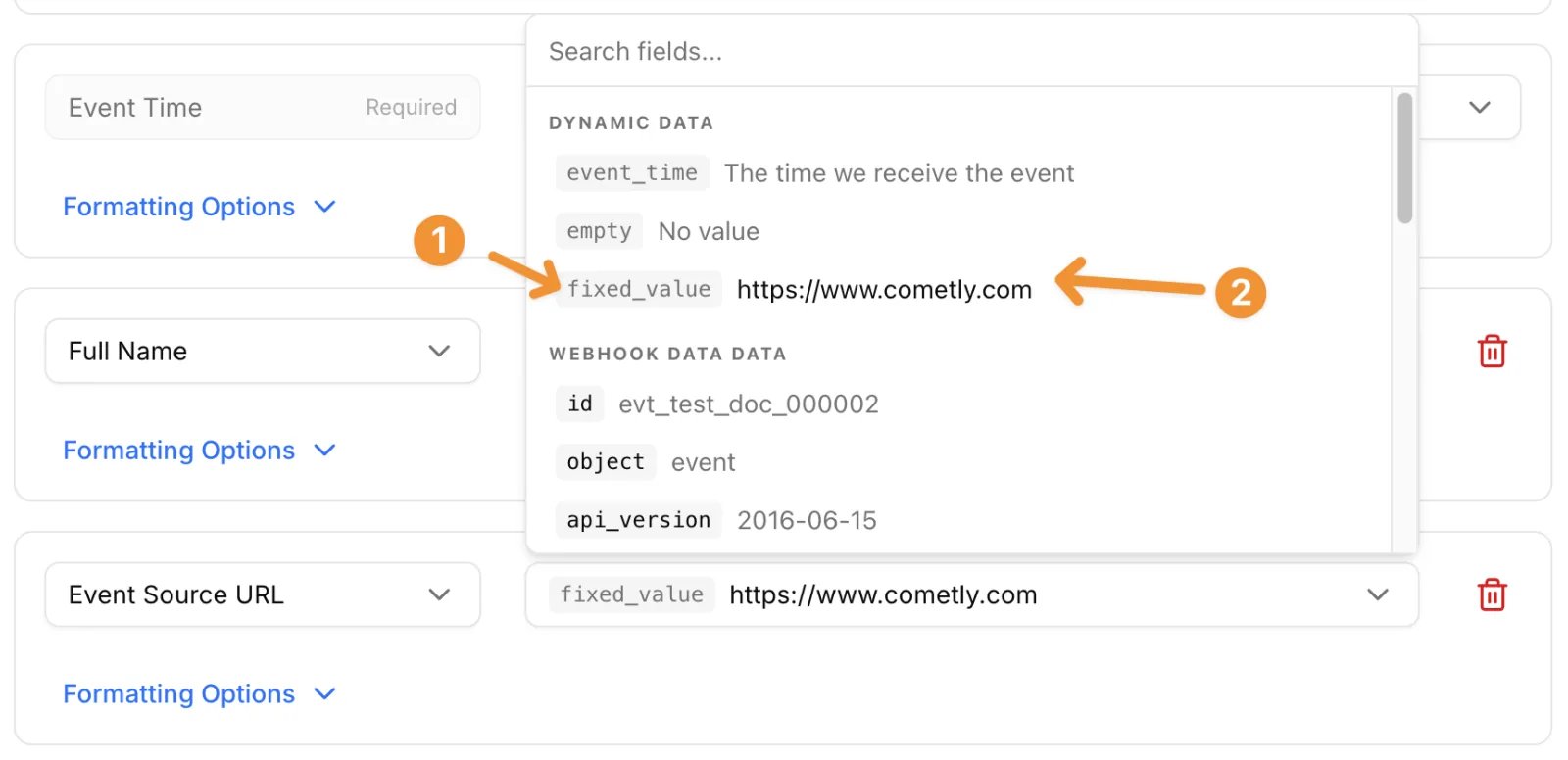
- On the Configure Mapping step, click Add Field and choose Event Source URL under Cometly Fields.
- Open the selector under Data Fields. Under Dynamic Data, choose the
fixed_valueoption. The selector closes, and you type the URL of the funnel in the row itself. - Click Save & Continue.
Use filters to target the correct funnel
Apply filters to each event integration so that only the correct one processes an event. You add them on the Filtering step, which follows the mapping step. For example, use a webhook field such asfunnelId, pageId or a custom tag to:
- Match the correct integration to the correct funnel.
- Prevent duplicate or incorrect events from being sent.
Check it worked
Open each event from Events Manager again. On the mapping step, Event Source URL is listed with that funnel’s URL as its fixed value. On the Filtering step, a sample record from the matching funnel shows a green box confirming that the webhook would have continued, with PASS next to each condition.Recap
- Platforms like ClickFunnels don’t send Event Source URLs by default.
- If you use one pixel across multiple funnels, set a fixed value per domain.
- Create a separate integration per funnel.
- Use filters to match data to the correct funnel.
- No changes are needed to your pixel code.
Frequently asked questions
Do I need a new pixel?
No. You do not need to reinstall or reconfigure your pixel. Your tracking stays the same. This is strictly an integration-level change that gives each funnel its own Event Source URL value.Does Cometly send the Event Source URL to Meta automatically?
For events tracked on your website, yes: Cometly sends the URL where the event was tracked as the Event Source URL. Events that arrive through an integration such as a webhook may not include a page URL, so you set it yourself with the steps on this page.Is the Event Source URL field required on every event?
No. Event Source URL is an optional field in the event mapping. Add it if your business is in one of Meta’s restricted categories and your integration doesn’t send a page URL.Next steps
- Event source URL for the Meta Conversion API
- Send event data to Cometly with webhooks
- Configure the Meta Conversion API
- Fix Meta Conversion API events that are not sending