

Step 1: Get your Taboola API credentials
To connect Taboola to Cometly, you need your Client ID and Client Secret from Taboola. The only way to get these is by emailing Taboola support directly. Send an email to support@taboola.com and request your API Client ID and Client Secret. Once you receive them, move on to Step 2.Step 2: Connect Taboola in Cometly
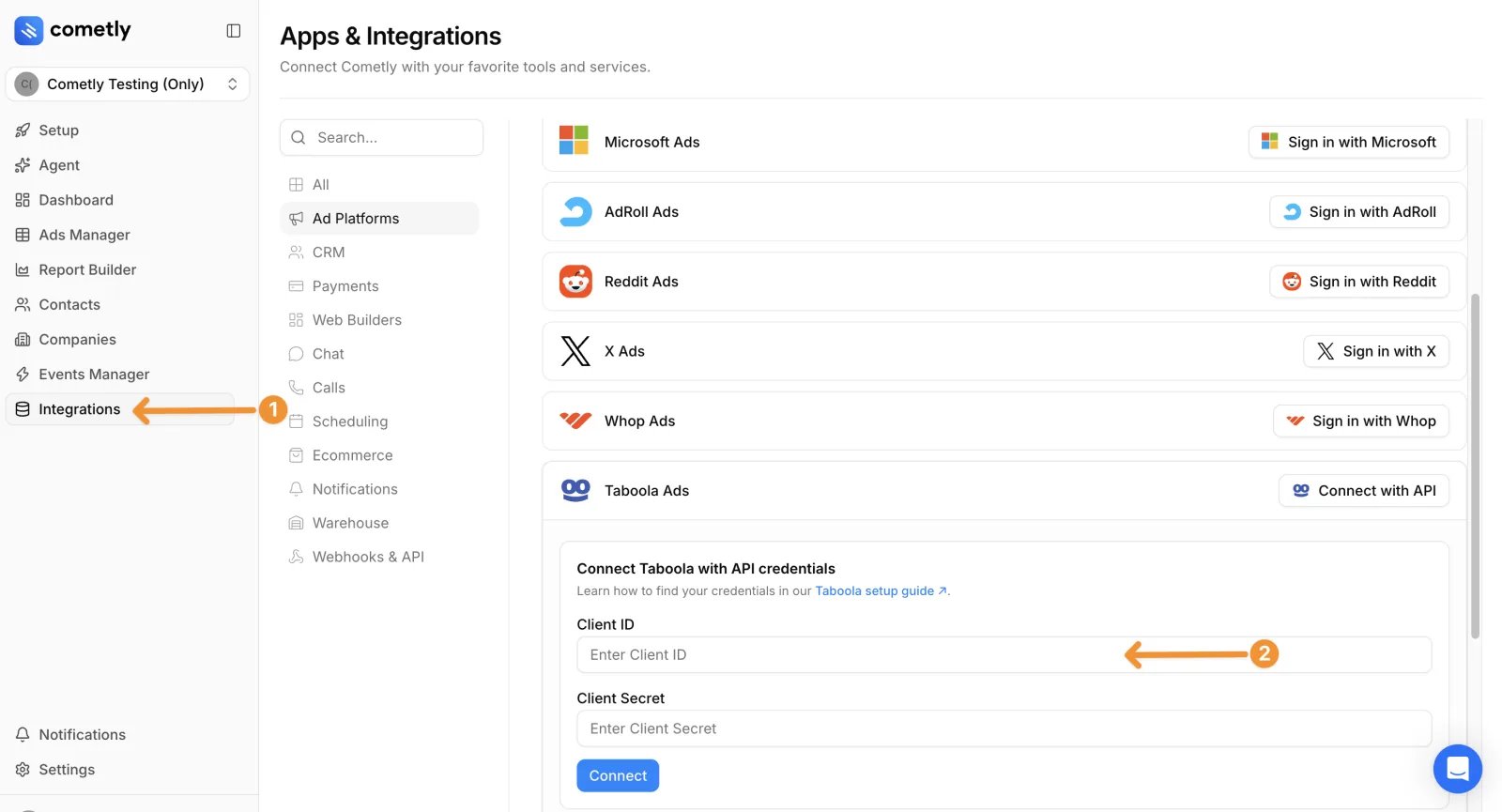
- In Cometly, click Integrations in the left sidebar.
- In the Ad Platforms section, find Taboola Ads and click Connect with API.
- Enter your Client ID and Client Secret in the corresponding fields.
- Click Connect.
- In the list of ad accounts that appears, click Connect & Sync Data next to each ad account you want to track in this space (the Cometly workspace you are working in).
Step 3: Add Cometly tracking parameters to your Taboola campaigns
After connecting your Taboola account, place Cometly’s tracking parameters on your Taboola campaigns. You do this inside Taboola’s Realize platform at the campaign level.- Log in to your Taboola Realize dashboard and go to Campaigns.
- Find the campaign you want to track and click the edit icon (pencil) on the right side of the campaign row.
- In the campaign edit panel, scroll down past Campaign Setup.
- Find the Tracking section and expand it.
-
In the Tracking Code field, paste the following:
- Click Save.
Tracking parameter breakdown
Taboola fills in these dynamic macros (
{campaign_id} and {campaign_item_id}) automatically when a user clicks your ad. This lets Cometly match each click back to the correct campaign and ad.
Tips
- Apply tracking at the campaign level, not the ad level. Every ad in the campaign is then tracked automatically, and you avoid sending ads back through Taboola’s policy review when you edit tracking parameters.
- Remove Taboola’s default UTMs if needed. When you create a new campaign, Taboola may auto-populate
utm_source=taboola&utm_medium=referralin the tracking code field. Replace this with the Cometly tracking parameters above. - Do not duplicate parameters. If you use Cometly’s tracking parameters at the campaign level, do not also add them to individual ad URLs. Using the same parameters at both levels causes incorrect data.
- Repeat for every campaign. Each Taboola campaign you want to track in Cometly needs the tracking code added.
Check it worked
On the Integrations page, expand Taboola Ads: the status reads Connected and your ad account is listed under Connected Taboola Ad Accounts. Within 30 to 60 minutes, your active Taboola campaigns appear in the Ads Manager when you select your Taboola ad account.Frequently asked questions
How often does Cometly update Taboola ad data?
Cometly pulls Taboola ad data, such as amount spent, clicks and impressions, every 30 minutes. It also pulls the previous days again once a day, because ad platforms sometimes adjust a day’s numbers after the day has ended.Can my teammates see or manage my Taboola connection in Cometly?
No. Ad platform connections are personal: they are tied to your user account, and only you can see and manage them. The ad accounts you connect to a space still report data for everyone who works in that space.What do I do if my Taboola data stops syncing in Cometly?
Open Integrations and expand Taboola Ads. If the status reads Connection Issue, Resync Required, click Resync, enter your Client ID and Client Secret again, and click Resync. The resync has to be done by the user who connected the profile.Next steps
- Set up the Taboola Conversion API to send your conversions back to Taboola.
- Connect your other ad platforms so all your ad spend is in one place.
- See how often data updates in Cometly to know how fresh your numbers are.
- Fix ad data that is not syncing if your Taboola numbers stop updating.
- Contact support through live chat or email.