

Start here
Cometly does not have a native BigCommerce integration. This page shows you how to send paid orders from BigCommerce to Cometly using Zapier. If you do not want to use Zapier, a developer can set up BigCommerce Webhooks to send paid orders to a Cometly webhook URL instead. See Cometly webhooks.Before you start
- Install the Cometly pixel on your store. See Install and verify the Cometly pixel.
- Connect Zapier to Cometly. See Zapier integration.
Send paid BigCommerce orders to Cometly with a Zap
1
Log in to Zapier
Log in to your Zapier account and create a new Zap.
2
Set the trigger
- App: search for and select BigCommerce.
- Trigger event: choose Order Status Updated. This lets you track orders as their status changes.
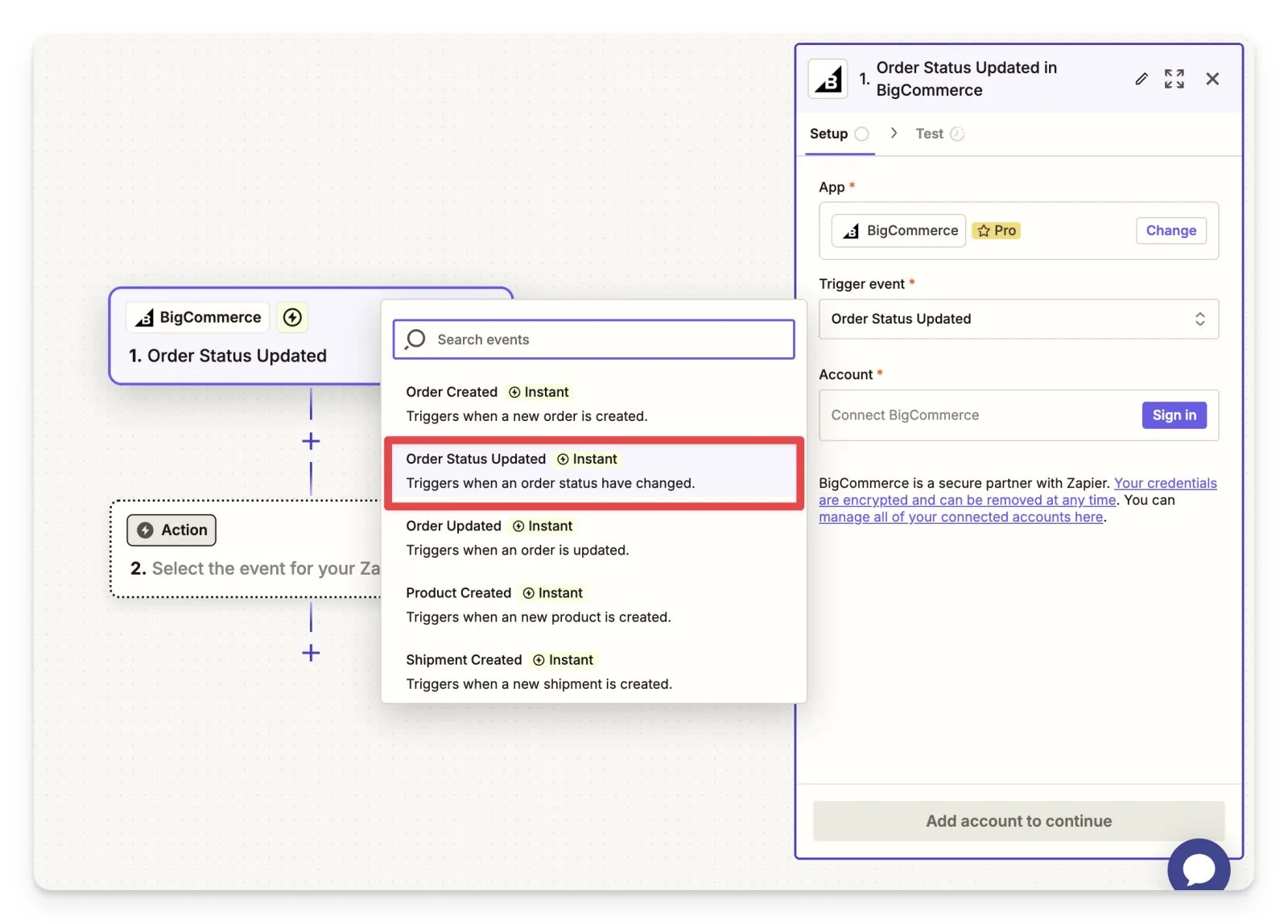
- Account: link your BigCommerce account to Zapier by following the authentication steps.
3
Add a filter
Add a Filter step so the Zap only continues when the order status equals “Paid”, or the equivalent status used in your BigCommerce setup.
4
Choose Cometly as the action
- Search for and select Cometly as the action app.
- For the action event, choose Send Event.
- Choose the Purchase event.
- Follow the steps in Zapier integration to map the order fields and finish setting up Cometly as an action.
Check it worked
Click Test Step in Zapier to send a test event to Cometly. Then open Events Manager in Cometly and check the Events Log tab: the test Purchase appears there. Once your Zap is on, new paid orders show up there too.Frequently asked questions
Why does the BigCommerce Zap need a filter for paid orders?
The Order Status Updated trigger runs when an order’s status changes, not only when the order is paid. The filter stops the Zap unless the status is “Paid” (or your store’s equivalent), so only paid orders are sent to Cometly as Purchase events.Which BigCommerce order fields should I send to Cometly?
Send the customer’s email address and the order amount. The email identifies the customer, and the amount lets Cometly report revenue. Fields such as first name, last name and phone number add detail to the contact in Cometly.Do I still need the Cometly pixel on my BigCommerce store if I use Zapier?
Yes. The pixel (the tracking script on your site) records the visit and the ad click behind it, and the Zap sends the order. Cometly uses the customer’s email to connect the two, so the purchase is tied to the right ad.Next steps
- Map order fields and test your Zap in the Zapier integration guide
- Install and verify the Cometly pixel on your store
- Send orders with Cometly webhooks instead of Zapier
- Learn how events work in Cometly