

Add the URL parameters
1
Open Meta Ads Manager
Log in to your Meta Ads Manager account and go to the campaign that includes the existing post ad you want to update.
2
Locate the existing post ad
Under the campaign, select the ad set that contains the existing post ad. Find the ad you want to edit and click Edit.
3
Find the URL parameters field
In the ad settings, locate the Tracking section and scroll down until you find the URL parameters field.
4
Add your URL parameters
In the URL parameters field, enter the Cometly Meta Ads parameters:You can also copy them in Cometly under Setup, step 4 Add URL parameters to your ads, with Meta Ads selected.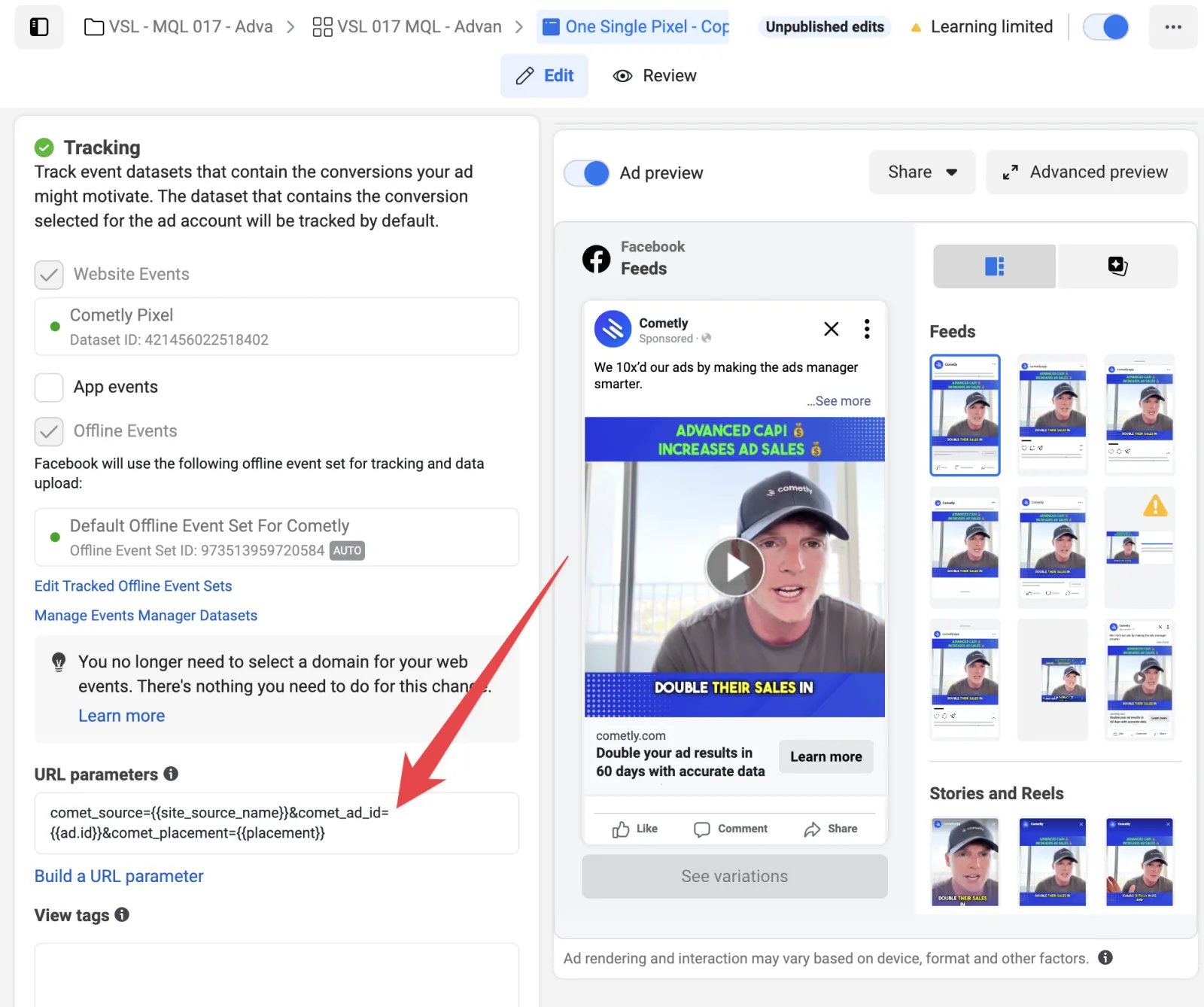
5
Save and publish
Once you’ve added the URL parameters, click Publish to apply the changes.
Check it worked
After the next data refresh, open the Ads tab of the Ads Manager in Cometly and choose the Tracking Status column preset. The ad’s URL Params column shows the Cometly parameters, and the ad has no red dot with the tooltip UTM Setup Error. Allow up to 1 hour for the refresh.Frequently asked questions
Do I need to add URL parameters to every Meta ad?
Yes. Every Meta ad you want to track needs the Cometly URL parameters, including each new ad you create later. Ads with no website link, such as lead form, Messenger or WhatsApp ads, are not flagged for missing parameters.Does Cometly add URL parameters to Meta ads automatically?
No. You paste the parameters into each Meta ad yourself. Cometly checks them on every sync and flags an ad whencomet_ad_id={{ad.id}} is neither in its URL parameters nor on its website link.
How do I test that the URL parameters on my Meta ad work?
Open the ad from a feed preview in Meta Ads Manager, click it like a normal user, and check that the Cometly parameters in the address bar are filled in with real values. Do not use the Preview link at ad level, because it does not pass the dynamic parameters through. The full test is in Test Meta ads tracking.Next steps
- Test your Meta ads tracking end to end
- Fix UTM Setup Errors on your ads
- Set up URL parameters for Meta carousel ads
- Set up URL parameters for Meta catalog ads
- Connect Meta Ads to Cometly