

Start here
Understanding Meta vs. Cometly attribution
When reviewing your campaign performance, you may notice that Meta reports more conversions than Cometly. Cometly attribution differs from Meta Ads Manager because each platform attributes conversions (decides which ad gets credit for a lead or sale) in its own way. Meta includes view-through conversions, which count users who may have only viewed your ad without clicking it. Cometly provides click-through attribution, which counts only users who actively engaged with your ad. This gives you more reliable and actionable insights for optimizing your campaigns. This article explains why Cometly’s data is better suited for performance-driven decisions, and how to configure Meta Ads Manager to identify view-through conversions for comparison.Why Cometly attribution data differs from Meta’s data (and why that’s a good thing)
Both platforms provide valuable insights, but they approach attribution differently, which leads to variations in reported conversions.Meta’s approach to attribution
Meta Ads Manager often includes view-through conversions, which occur when someone views your ad but doesn’t click on it, and then converts later. This measures your ad’s influence on potential customers, even if they didn’t engage directly with it. View-through conversions offer insight into how ads affect overall visibility and brand awareness, but they don’t always represent direct, click-based engagement.Cometly’s click-based attribution focus
Cometly specializes in click-based attribution (the way the ad platforms used to work before privacy changes), which gives you a clearer and more direct understanding of how your ads drive engagement. By focusing only on click-based conversions, Cometly removes any ambiguity about whether a conversion was influenced by an ad click or a simple impression. This helps you make decisions based on tangible user actions, because every conversion tracked is tied directly to a customer’s interaction with your ad.Why look at Cometly for decision-making?
- Actionable insights: Cometly gives you precise, click-based data that ties conversions directly to ad engagement. This helps you allocate your ad spend to campaigns that are genuinely driving results.
- Complementary data: Meta’s view-through conversions provide a broader perspective, while Cometly’s data is purposefully streamlined for actionable insights. If you want to evaluate view-through conversions, you can always view them in Meta Ads Manager.
- Customizable attribution models: Cometly lets you analyze data your way, with the attribution model and attribution window you choose.
Meta and statistical modeling: what you need to know
With the iOS update, Meta has faced significant challenges in reporting accurate conversion details for users who have opted out of tracking. Currently, over 85% of iOS users worldwide have chosen to opt out. To address this gap, Meta introduced an approach called statistical modeling. It lets Meta populate your Ads Manager with estimated data, providing an approximation of your ad performance.What does statistical modeling mean?
Statistical modeling involves estimating over 85% of conversion data for users who have opted out of tracking. While this is a creative solution to bridge the data gap, this data is largely an educated guess. Meta even labels it as “estimated” in your Ads Manager, as highlighted in the screenshot below. By understanding this distinction, you can better interpret your Meta Ads Manager results and rely on tools like Cometly for accurate, click-based conversion data. Read Meta’s article about how they use statistical modeling.What to do if Meta shows more conversions
It’s not uncommon to see higher conversion counts in Meta because it includes view-through conversions. This doesn’t mean Cometly isn’t working. It is looking at the data through a different lens. If you want to see view-through conversions alongside your click-based conversions, you can always refer to Meta Ads Manager for that information. Cometly, meanwhile, provides the direct, click-based conversions you need to optimize campaigns with confidence.Configure columns in Meta Ads Manager to see view-through conversions
If you are using Meta browser events alongside Cometly’s server-side Conversion API (the connection that sends the conversions Cometly tracks straight to Meta), it’s important to understand how Meta attributes conversions. Meta often includes view-through conversions: instances where someone viewed your ad but didn’t click on it. This can lead to over-reporting conversions in Meta that may not align with actual user actions. In contrast, Cometly uses click-through attribution, giving you a more precise view of conversions based on direct user engagement. You can also open a contact from Contacts in Cometly to see their exact click touchpoints. To see which conversions Meta attributes as view-through, adjust the column settings in your Ads Manager. This shows the breakdown between view-through and click-through conversions. Follow the steps below to customize your view in Meta.-
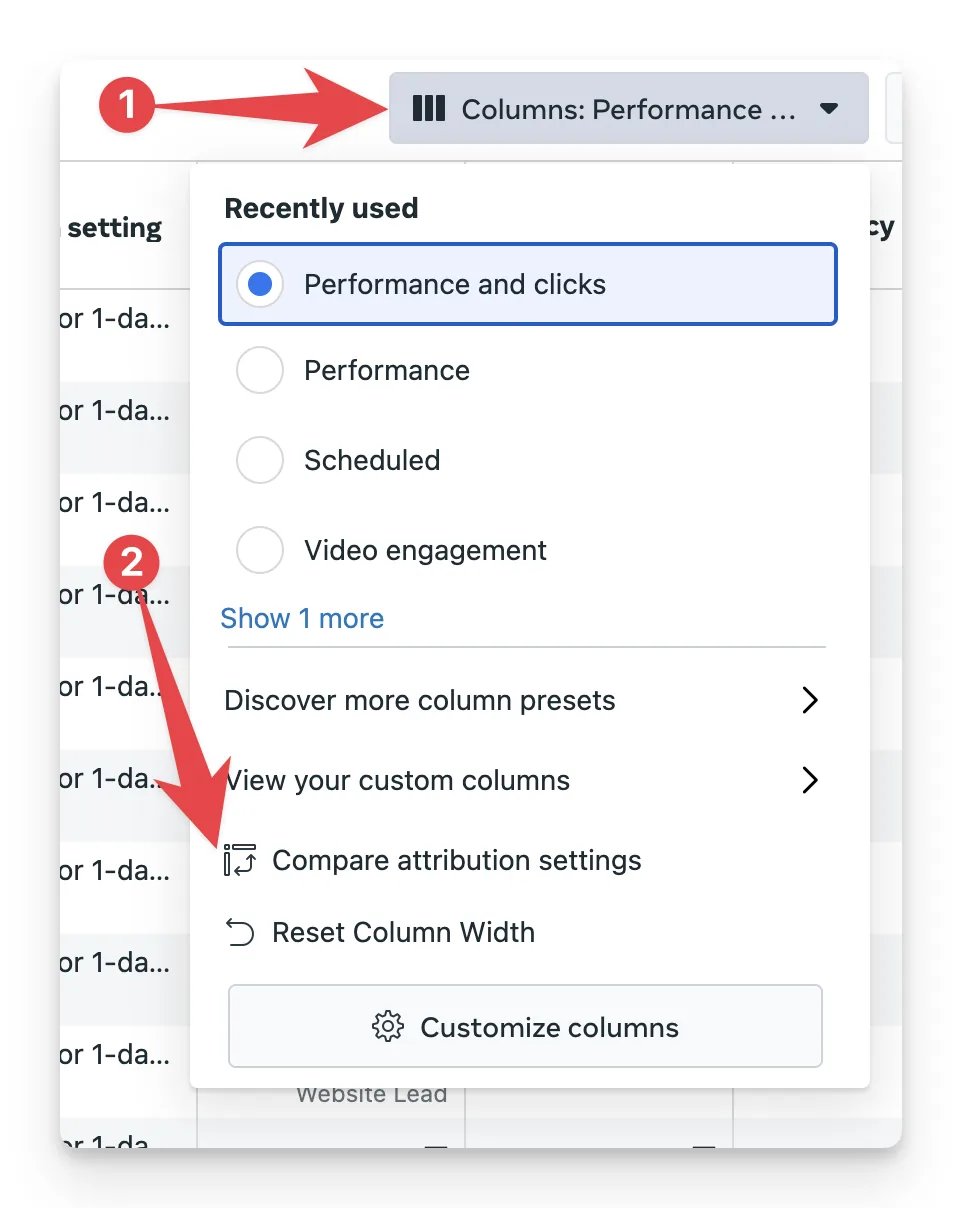
In Meta Ads Manager, click Columns and then click Compare attribution settings.
-
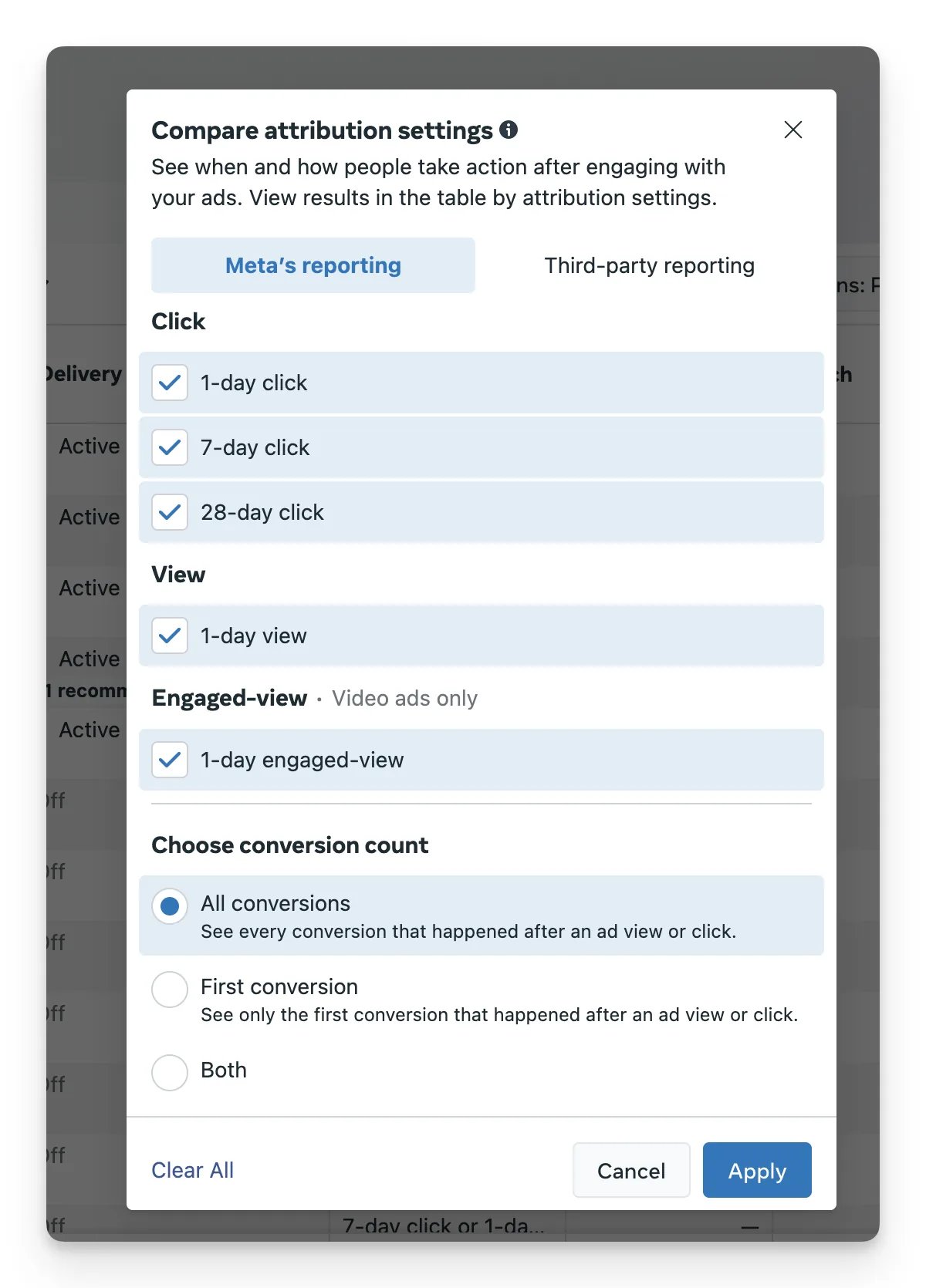
Select all attribution settings and click Apply.
-
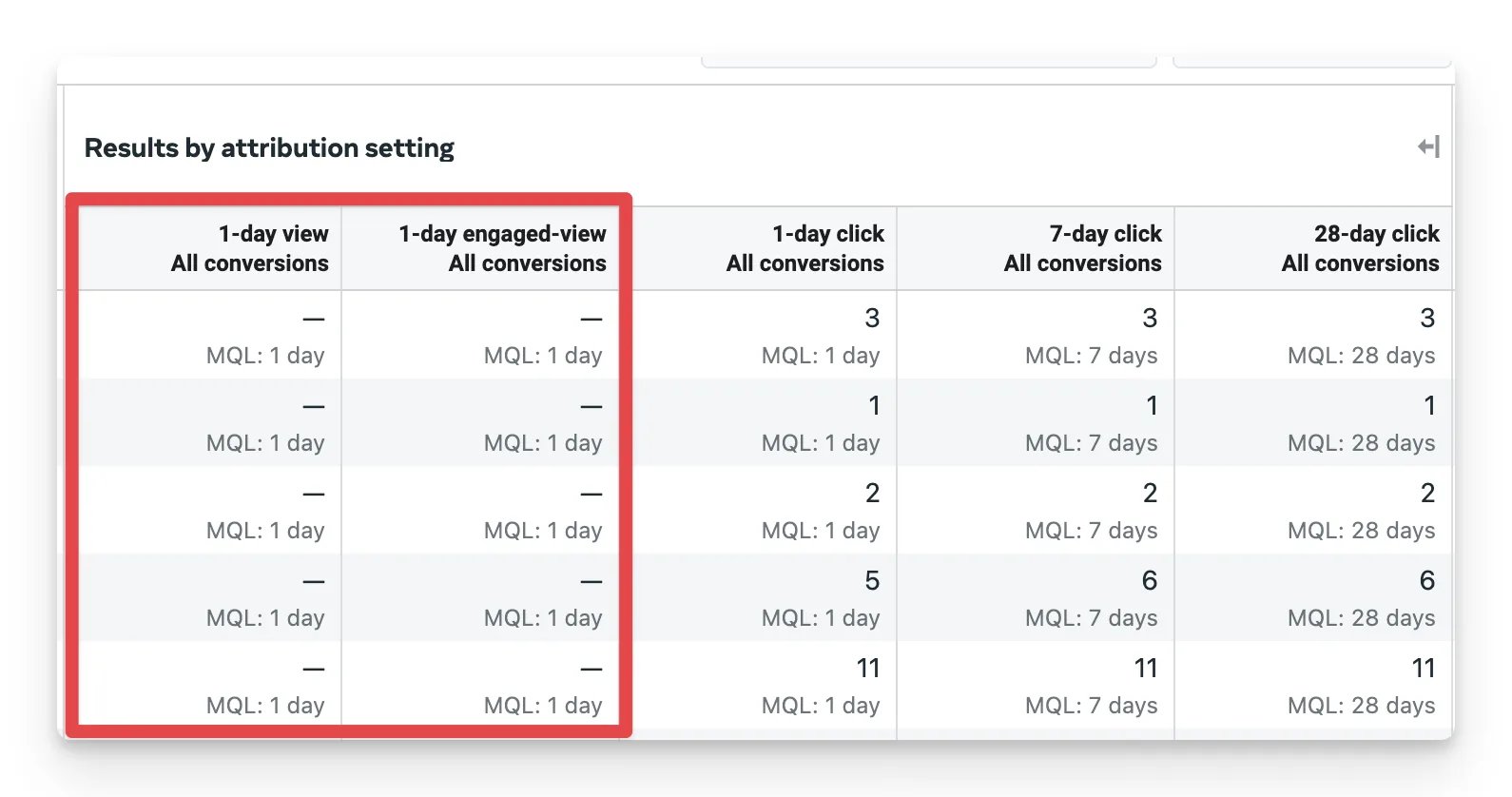
Meta Ads Manager now shows which conversions are view-through conversions.
Confirm the difference is view-through conversions
In Meta’s breakdown, the view and engaged-view columns hold the conversions Meta counted without an ad click. Cometly does not count those, so compare Cometly’s numbers with Meta’s click columns instead of Meta’s total. To check a single conversion, open the contact from Contacts in Cometly and look at the click touchpoints recorded before it.Frequently asked questions
Can I change the attribution window in Cometly to match Meta?
Yes. In the Ads Manager, use the Attribution window selector above the table to pick 1 Day, 7 Days, 14 Days, 28 Days, 30 Days, 60 Days, 90 Days or LTV. LTV (the whole customer journey) is the default, so a shorter window can bring the comparison closer. See attribution models and attribution windows.Why is amount spent in Cometly different from Meta Ads Manager?
Small differences in Amount Spent usually come from one of three things: your space currency differs from your Meta ad account currency, your space timezone differs from your Meta ad account timezone, or Meta has not finished processing data from previous days. See Amount spent in Cometly differs slightly from Meta.How do I check that Cometly is tracking my Meta ads correctly?
Run an end-to-end test: click one of your own Meta ads, complete the conversion, and confirm that Cometly tracked the click and the conversion. Follow the steps in Test your Meta ads tracking.Next steps
- Choose an attribution model and attribution window
- Test your Meta ads tracking
- Configure the Meta Conversion API
- Find out why amount spent differs from Meta